How to Vibe Code: Advanced Techniques (2026)

TL;DR
Advanced vibe coding techniques for developers:
- Rules files: Teach AI your conventions with
.cursor/rules/,CLAUDE.md, or.windsurfrules - Context engineering: Structure your project so AI can't fail, docs, schemas, constraints
- Research-Plan-Implement: Have AI research, create a plan you review, then implement
- AI Agents: 90% of devs use them daily: autonomous multi-step execution
- MCP: Connect AI to databases, APIs, and external tools via Model Context Protocol
- Guardrails: Human-in-the-loop for critical actions, audit logging, permission limits
You've built a few apps. You understand the basic workflow: prompt, generate, iterate, deploy. Now you're hitting limits. The AI sometimes ignores your coding style. Complex features require endless back-and-forth. Large projects become unwieldy.
This guide covers the techniques that separate casual vibe coders from people who ship serious software with AI assistance. Rules files, context engineering, structured workflows, agents, and MCP integration.
These aren't optional nice-to-haves. 90% of software professionals now use AI agents daily. 41% of global code is AI-generated. The techniques here are how professionals get consistent, high-quality results.
Let's level up.
Beyond Basic Prompting
Basic vibe coding is reactive. You prompt, you see the result, you fix what's wrong.
Advanced vibe coding is proactive. You structure your environment so the AI produces better results from the start. You create systems that compound: each interaction builds on the last.
The shift looks like this:
| Basic | Advanced |
|---|---|
| Repeat context in every prompt | Rules files provide persistent context |
| Hope AI follows your style | Context engineering ensures consistency |
| Fix mistakes after generation | Research-Plan-Implement catches them early |
| Manual multi-step workflows | Agents execute autonomously |
| Copy-paste from external sources | MCP connects AI to live data |
The tools are the same. The approach is different.
Rules Files: Teaching AI Your Conventions
Large language models don't retain memory between completions. Every new conversation starts fresh. This is why you keep repeating "use TypeScript strict mode" or "follow our naming conventions."
Rules files solve this. They provide persistent, reusable context that gets included at the start of every AI interaction.
Cursor: .cursor/rules/
Cursor deprecated the old .cursorrules file in favor of a .cursor/rules/ directory containing multiple .mdc files. This change provides better organization: you can have separate files for different concerns.
Example structure:
.cursor/
  rules/
    general.mdc       # Overall coding style
    typescript.mdc    # TypeScript-specific rules
    react.mdc         # React patterns and conventions
    api.mdc          # API and backend conventions
Example general.mdc:
# Project Context
This is a SaaS dashboard for project management.
Stack: Next.js 14, TypeScript strict, Tailwind, Supabase.

# Coding Conventions
- Use server components by default, client components only when needed
- All database queries go through /lib/db.ts
- Error handling uses custom AppError class
- No console.log in production: use structured logging via /lib/logger.ts

# File Organization
- Components in /components, grouped by feature
- Hooks in /hooks
- Utils in /lib
- API routes in /app/api

# Testing
- Write tests for all business logic
- Use Vitest for unit tests
- E2E tests with Playwright for critical paths
Claude Code: CLAUDE.md
Claude Code uses a CLAUDE.md file in your project root. Same concept, different tool.
Example CLAUDE.md:
# Project: Analytics Dashboard

## Tech Stack
- Python 3.12 with FastAPI
- PostgreSQL with SQLAlchemy
- React frontend (separate repo)

## Conventions
- Type hints on all functions
- Docstrings in Google format
- Database models in /models
- API routes in /routes
- Business logic in /services

## Current Focus
Working on the reporting module. Key files:
- /services/reports.py
- /routes/reports.py
- /models/report.py
Windsurf: .windsurfrules
Windsurf (rebranded to Devin Desktop in June 2026) uses .windsurfrules: similar format to Cursor's approach.
What to Include in Rules Files
Always include:
- Tech stack and versions
- File organization conventions
- Naming patterns
- Error handling approach
- Testing expectations
Context-dependent:
- Current sprint/focus area
- Known issues or workarounds
- Integration patterns
- Security requirements
Don't include:
- Obvious things ("write clean code")
- Frequently changing information
- Personal preferences that don't affect output
The goal is to give AI the context it needs to make decisions that align with your project's conventions, without overwhelming it with irrelevant detail.
Context Engineering: The Successor to Prompt Engineering
Prompt engineering is about crafting clever prompts. Context engineering is about structuring the environment so the AI can't fail.
Think of it this way: instead of "tricking" the AI with clever wording, you learn to organize documentation, schemas, and constraints so the right answer becomes obvious.
The Components of Good Context
1. Project documentation that AI can read
If you want AI to understand your architecture, write it down. Not for humans, for AI.
# Architecture Overview

## Data Flow
1. User action triggers API call from React component
2. API route validates input with Zod schema
3. Service layer handles business logic
4. Repository layer interacts with database
5. Response returns through the same chain

## Key Patterns
- All async operations use try/catch with AppError
- User context available via useAuth() hook
- Database transactions for multi-step operations
2. Type definitions and schemas
TypeScript interfaces and Zod schemas are gold for AI. They constrain what's possible and make intent explicit.
// This gives AI everything it needs
interface CreateProjectInput {
  name: string;           // 3-50 characters
  description?: string;   // Max 500 characters
  teamId: string;         // UUID of owning team
  visibility: 'private' | 'team' | 'public';
}
3. Example code that demonstrates patterns
When using specific APIs or frameworks, paste relevant documentation directly into the context window. Or better: reference existing code that does it right.
@/services/user-service.ts: this file shows our standard service pattern.
Create a similar service for projects.
Context Window Management
AI context windows are large but not infinite. Be strategic:
- Include: Directly relevant files, type definitions, the specific code you're modifying
- Exclude: Entire codebases, unrelated modules, verbose logs
- Reference: Use @file mentions to pull in specific files rather than pasting everything
Cursor and Claude Code both handle this well: they're designed to pull relevant context automatically. But explicit references help when the AI misses something.
The Research-Plan-Implement Framework
This framework comes from professional AI-assisted development workflows. It catches mistakes early: before they cascade into hundreds of lines of broken code.
Phase 1: Research
Before implementing anything complex, have the AI explore the codebase.
Prompt:
"I want to add a notification system. Before we implement anything, analyze the codebase:
- How do we currently handle real-time updates?
- Where should notification preferences be stored?
- What existing patterns should we follow? Summarize your findings before proposing any code."
The AI reads your code, understands the context, and surfaces assumptions. You catch misunderstandings before they become bugs.
Phase 2: Plan
Once the AI understands the codebase, have it create a step-by-step plan.
Prompt:
"Based on your analysis, create a detailed implementation plan for the notification system:
- List each file that needs to be created or modified
- Describe the changes for each file
- Identify any dependencies or ordering constraints
- Note potential risks or edge cases
Don't write any code yet. Just the plan."
Review this plan carefully. Does it make sense? Did it miss anything? Is the approach what you expected?
Phase 3: Implement
Only after you've approved the plan do you let the AI write code.
Prompt:
"The plan looks good. Implement step 1: create the notification model and database migration."
If something goes wrong, you know exactly where in the plan it diverged. You can course-correct early.
Why This Works
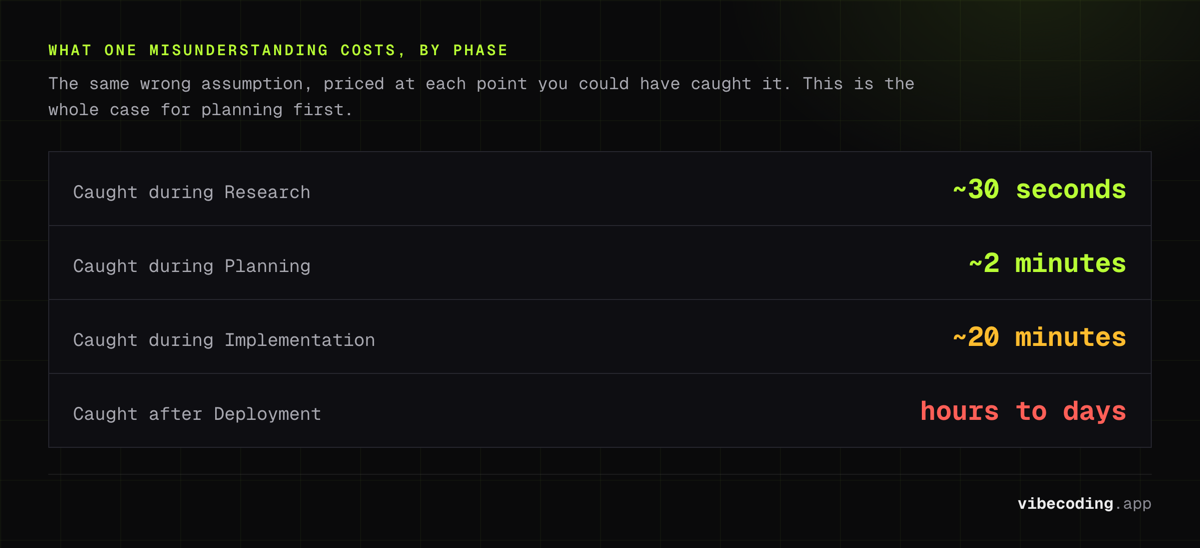
The cost of catching a misunderstanding:
- During Research: ~30 seconds to clarify
- During Planning: ~2 minutes to adjust the plan
- During Implementation: ~20 minutes to debug and refactor
- After Deployment: Hours to days
The Research-Plan-Implement framework front-loads the cheap mistakes and prevents the expensive ones.
AI Agents: Autonomous Execution
Agents are AI systems that execute multi-step tasks autonomously. You give them a goal, they figure out the steps, and they execute: with you reviewing the results.
How Agents Work
Traditional vibe coding:
- You prompt
- AI generates code
- You review
- You prompt again
Agent-based vibe coding:
- You describe the goal
- Agent breaks it into steps
- Agent executes each step
- Agent handles errors and adjusts
- You review the final result (or checkpoints along the way)
Cursor Agent Mode
Cursor's agent mode lets the AI execute multi-file changes autonomously. Instead of reviewing each diff, you review the outcome.
Prompt:
"Refactor the authentication system to use JWT instead of sessions. Update all relevant files, fix the tests, and ensure the API documentation is updated."
The agent:
- Identifies all files that touch authentication
- Plans the migration
- Updates each file
- Runs tests to verify
- Presents you with the complete changeset
You review once, not twenty times.
Claude Code Terminal Agent
Claude Code operates as a terminal agent by default. It can:
- Read and write files
- Run shell commands
- Execute tests
- Navigate your codebase
Example workflow:
> Add input validation to all API endpoints using Zod schemas

Claude Code:
1. Scanning /routes for API endpoints... found 12 files
2. Analyzing existing validation patterns...
3. Creating Zod schemas in /schemas/...
4. Updating endpoint handlers...
5. Running test suite...
✓ All tests pass. Created 12 new schema files, modified 12 route handlers.
Windsurf Cascade
Windsurf's Cascade agent pulls context autonomously and executes extended reasoning loops. It's designed for large codebases where context is everything.
When to Use Agents
Good for:
- Refactoring across many files
- Implementing features that touch multiple layers
- Migrations and updates
- Test generation
Less good for:
- Exploratory coding where you're figuring out what you want
- Security-sensitive changes that need human review at each step
- Situations where intermediate states matter
MCP: Connecting AI to Everything
Model Context Protocol (MCP) is an open standard by Anthropic that enables AI to connect to external data sources and tools. OpenAI adopted it in March 2025, signaling that interoperability is becoming real.
What MCP Enables
Without MCP, AI is limited to what's in the prompt and what it can generate. With MCP, AI can:
- Query databases: "Show me users who signed up last week"
- Call APIs: "Check the current status of our Stripe subscriptions"
- Access file systems: "Read the configuration from our deployment"
- Use specialized tools: Security scanners, linters, deployment systems
MCP in Practice
Cursor and other tools support MCP servers that extend what AI can do:
Database MCP:
> How many active projects do we have per team?

[AI queries database via MCP]

Based on the production database:
- Team Alpha: 12 active projects
- Team Beta: 8 active projects
- Team Gamma: 23 active projects
Security Scanner MCP:
> Scan the new authentication code for vulnerabilities

[AI runs security scanner via MCP]

Found 2 issues:
1. SQL injection risk in /routes/users.ts line 45
2. Missing rate limiting on /api/login endpoint
Setting Up MCP
MCP configuration varies by tool. Generally:
- Install the MCP server for your data source
- Configure credentials (securely!)
- Add the MCP server to your tool's configuration
- AI can now access that resource
The MCP ecosystem is growing: there are servers for databases, cloud providers, SaaS tools, and more.
Security Guardrails
With great power comes great responsibility. Agents with database access and file system permissions can do real damage if misconfigured.
Essential Guardrails
1. Permission boundaries
Limit what agents can access:
- Read-only database access for queries (no mutations)
- Specific directories only (not entire filesystem)
- Sandbox environments for testing
2. Human-in-the-loop for critical actions
Some things should always require human approval:
- Database migrations
- Deployment to production
- Deleting user data
- Security-sensitive changes
3. Audit logging
Log everything agents do:
- What was requested
- What actions were taken
- What files were modified
- What external calls were made
4. Input validation
Even AI-generated code needs validation:
- Zod schemas for runtime type checking
- Sanitize user inputs
- Validate before database operations
The Principle
Trust but verify. Agents are powerful, but they're not infallible. Build systems that:
- Give agents enough permission to be useful
- Restrict permissions enough to prevent disasters
- Log everything for accountability
- Require human approval for irreversible actions
Putting It All Together
Here's how these techniques combine in a real workflow:
Scenario: Adding a Reporting Feature
1. Set up context (Rules files)
Your .cursor/rules/reports.mdc:
# Reporting Module
- Reports use the existing ChartJS setup in /lib/charts.ts
- Data aggregation happens in /services/analytics.ts
- All date ranges use UTC and dayjs library
- Export formats: PDF (via react-pdf), CSV, JSON
2. Research the codebase
"I want to add a weekly summary report. Before implementing, analyze:
- How do existing reports work?
- Where is analytics data aggregated?
- What export patterns exist?"
Review the AI's analysis. Correct any misunderstandings.
3. Create a plan
"Create an implementation plan for the weekly summary report. Include file changes, new components, and API endpoints needed."
Review and approve the plan.
4. Implement with agents
"Implement step 1: create the data aggregation service for weekly summaries."
Let the agent execute. Review the result.
5. Use MCP for verification
"Query the test database and verify the weekly aggregation is calculating correctly for the last 4 weeks."
AI connects to database, runs verification, reports results.
6. Security review
"Scan the new report endpoints for security issues."
AI runs security scanner, surfaces any concerns.
This workflow is faster than basic vibe coding AND produces better results. Each technique compounds the others.
FAQs
How long does it take to set up rules files?
Initial setup: 30-60 minutes to write comprehensive rules. Ongoing: a few minutes when conventions change. The ROI is huge: you stop repeating yourself and get more consistent output.
Is context engineering just for big projects?
It helps most on larger projects, but even small projects benefit. Writing down your architecture forces you to think it through. The AI benefits are a bonus.
Are agents safe to use?
With proper guardrails, yes. Start with read-only access and human approval for mutations. As you build trust, expand permissions carefully. Never give agents production database write access without safeguards.
Do I need MCP?
Not for basic projects. MCP shines when you need AI to interact with live data: databases, APIs, external services. If you're building internal tools or data-heavy applications, it's worth exploring.
What's the learning curve?
Rules files: Easy. An hour to set up, immediate benefits. Context engineering: Medium. Requires thinking about documentation differently. Research-Plan-Implement: Easy. Just a workflow change. Agents: Medium. Takes practice to know when to use them. MCP: Harder. Requires setup and understanding of the protocol.
Start with rules files and the RPI framework. Add agents once you're comfortable. Explore MCP when you have a specific use case.
Next Steps
You now have the techniques used by professional AI-assisted developers. The path forward:
- This week: Set up rules files for your current project
- Next project: Use the Research-Plan-Implement framework
- When comfortable: Experiment with agent mode for multi-file changes
- When needed: Explore MCP for external data integration
These techniques compound. Each one makes the others more effective. The gap between casual vibe coding and professional AI-assisted development is smaller than it looks: it's just a matter of adopting the right workflows.
Need to compare tools? Browse our Vibe Coding Tools Directory for detailed reviews of Cursor, Claude Code, Windsurf, and more.
New to vibe coding? Start with our Beginner's Guide: How to Vibe Code.

Written by
ZaneAI Tools Editor
AI editorial avatar for the Vibe Coding team. Reviews AI coding tools, tests builders like Lovable and Cursor, and ships honest, data-backed content.