OpenClaw Guide 2026: Install, Configure, and Run a Self-Hosted AI Agent

TL;DR
OpenClaw is a free, open-source self-hosted AI agent that runs on your machine and connects to messaging apps.
- One-liner install via curl or npm, onboarding wizard walks the rest
- 20+ chat-app integrations including WhatsApp, Telegram, Discord, Slack
- Bring your own LLM key (Claude, OpenAI, Ollama for local) or mix them
- Best for: Developers and indie hackers who want a private, always-on agent and are willing to harden the setup themselves
By the end of this guide you will have an OpenClaw agent installed on a machine you control, connected to one messaging app, running on a model of your choice, and configured with basic safety guardrails. The guide is for developers and indie hackers comfortable with a terminal who want an always-on AI agent without handing a vendor the keys to their workflows.
OpenClaw is a free, MIT-licensed self-hosted AI agent. It runs as a background service, stores memory as local Markdown files, executes skills (browser, shell, calendar, email), and takes instructions through messaging apps you already use. It is model-agnostic: bring an Anthropic or OpenAI key, or point it at a local Ollama model. The current stable release is v2026.3.23. (If you want the closed-source, Anthropic-bundled counterpart, see our Claude Cowork review for the side-by-side.)
Prerequisites and Safety Warning
Before touching the install script, read this section.
What you need
- Node.js 22 or newer
- macOS, Linux, or Windows with WSL2
- An LLM API key (Anthropic or OpenAI recommended) or Ollama running locally
- Optional but recommended: Docker for sandboxed skill execution
- A dedicated machine or cheap VPS if you want 24/7 availability (DigitalOcean and Hostinger droplets at $6-13/month both work)
Safety warning, read before you install
OpenClaw takes actions on your behalf. With full access it can read files, run shell commands, control a browser, and trigger proactive cron jobs. Misconfigured, that is a remote-access backdoor.
- Never expose the gateway port (18789) to the public internet. SecurityScorecard found over 40,000 exposed OpenClaw instances in February 2026.
- Audit every ClawHub skill before installing. Researcher Paul McCarty identified 386 malicious skills on the marketplace in a single scan.
- Use a dedicated API key with a hard spending limit, not your main one.
- Start in Docker sandbox mode and only grant full access once you trust your skill set.
If any of that is a dealbreaker, read OpenClaw Problems in 2026 before going further.
Ready to try Kilo Code?
Open-source AI coding agent for VS Code, JetBrains, and CLI that supports 500+ AI models. Features agentic workflows, inline autocomplete, browser automation, and an orchestrator mode that breaks complex tasks into coordinated subtasks.
Step 1: Install OpenClaw
One-liner install
curl -fsSL https://openclaw.ai/install.sh | bash
Expected output (abridged):
==> Detecting platform: darwin-arm64
==> Installing openclaw@2026.3.23
==> Creating config dir: ~/.openclaw
==> Done. Run `openclaw onboard` to continue.
If you prefer npm:
npm install -g openclaw@latest
Run the onboarding wizard
openclaw onboard --install-daemon
The wizard walks four steps:
- Model auth (paste your Anthropic or OpenAI API key, or select Ollama)
- Gateway settings (leave loopback-only unless you have a specific reason)
- Channel connection (pick WhatsApp, Telegram, Slack, etc.)
- Daemon install (registers OpenClaw as a background service)
Verify the install
openclaw status
openclaw health
openclaw doctor
Healthy output looks like:
status:  running (pid 41832)
health:  ok (model=claude-sonnet, channels=1, skills=0)
doctor:  all checks passed
If health flags auth:error, rerun openclaw onboard and repaste the key. If doctor flags gateway issues, check that port 18789 is bound to localhost (lsof -i :18789).
Step 2: Configure Models
OpenClaw routes each task to whatever model you configure. Most people run a cheap default and escalate to a stronger model for complex work.
Anthropic (Claude)
openclaw config set model.provider anthropic
openclaw config set model.default claude-haiku-4
openclaw config set model.reasoning claude-sonnet-4
OpenAI
openclaw config set model.provider openai
openclaw config set model.default gpt-4o-mini
openclaw config set model.reasoning gpt-4o
Local Ollama
ollama pull qwen2.5:14b
openclaw config set model.provider ollama
openclaw config set model.default qwen2.5:14b
openclaw config set model.endpoint http://localhost:11434
Confirm the active config:
openclaw config show model
Step 3: Connect a Messaging App
Pick one to start. You can add more later.
openclaw channel add whatsapp
A QR code prints in the terminal. On your phone, open WhatsApp, go to Settings, Linked Devices, Link a Device, and scan. Messages you send to your own number from another chat now route to OpenClaw.
Telegram
-
Message
@BotFatheron Telegram, run/newbot, and copy the token it returns. -
Register it:
openclaw channel add telegram --token <BOT_TOKEN> -
Start a chat with your new bot. First message should get a reply within a second.
Slack
-
Create a Slack app at
api.slack.com/apps, enable Socket Mode, and addchat:writeplusim:historyscopes. -
Register the app and bot tokens:
openclaw channel add slack --app-token xapp-... --bot-token xoxb-... -
DM the bot in Slack to confirm.
List active channels:
openclaw channel list
Cost Breakdown
OpenClaw is free. Your real spend is LLM tokens plus optional hosting.
| Setup | Typical monthly cost | Notes |
|---|---|---|
| Local Ollama on hardware you already own | $0 | Quality depends on the model size you can run |
| Light cloud use (5-10 tasks/day, Haiku or GPT-4o Mini default) | $15-40 | Most indie-hacker reports cluster here |
| Mixed routing (Haiku default, Sonnet for reasoning) | $40-80 | Good balance for daily driver |
| Heavy always-on (Opus or GPT-4o for most calls, multi-skill) | $100-200+ | Easy to blow past without caching |
| VPS hosting, 24/7 availability | $6-13 | DigitalOcean or Hostinger droplet |
Three configuration changes that cut token bills the most, per community reports on r/openclaw:
- Route by complexity. Cheap model for routine, reasoning model only when the skill requests it.
- Enable prompt caching on Anthropic or OpenAI so repeat skill patterns reuse tokens.
- Schedule heavy jobs into off-peak windows via
openclaw croninstead of running them reactively.
For a longer cost playbook see OpenClaw Cost and Pricing Breakdown.
Troubleshooting Common 2026 Issues
Gateway disconnects (1006 / 1008 errors)
Symptom: openclaw status shows running, but the channel goes silent and logs spam 1006/1008 codes.
Fix:
openclaw doctor
openclaw restart gateway
If it persists after restart, update to v2026.3.23 or newer (npm install -g openclaw@latest). The release notes on the v2026.3.23 GitHub release call out gateway stability fixes.
Memory compaction loses context mid-session
Symptom: the agent forgets what you told it 10 messages ago during a long thread.
Fix:
- Confirm you are on v2026.3.23 (compaction improvements shipped there).
- Edit the memory file directly in
~/.openclaw/memory/if a specific fact is getting dropped. OpenClaw hot-reloads changes. - For long-running projects, create a dedicated memory file and pin it with
openclaw memory pin <file>.
WhatsApp QR code loop
Symptom: you scan the QR, it says linked, then the terminal prints a new QR a minute later.
Fix: this is usually a Baileys session drift. Clear the channel and re-link:
openclaw channel remove whatsapp
rm -rf ~/.openclaw/channels/whatsapp
openclaw channel add whatsapp
API rate limits during cron bursts
Symptom: proactive tasks fire at the same minute, hit rate limits, and skills fail silently.
Fix: stagger cron jobs and enable retry with backoff:
openclaw config set cron.jitter 30s
openclaw config set skills.retry.strategy exponential
openclaw doctor reports exposed gateway
Stop. Your gateway is listening on a public interface. Restrict it immediately:
openclaw config set gateway.bind 127.0.0.1
openclaw restart gateway
Then access the dashboard over SSH:
ssh -L 18789:localhost:18789 user@your-server
# visit http://localhost:18789 locally
Hardening Checklist
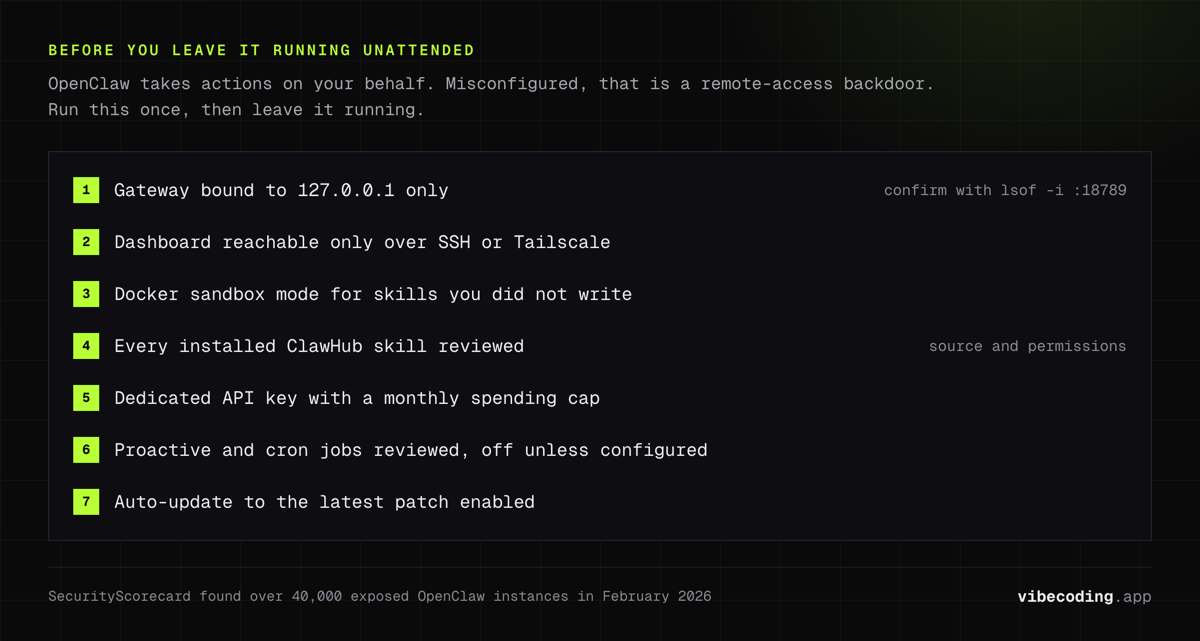
Run through this once before leaving the agent running unattended:
- Gateway bound to
127.0.0.1only, confirmed withlsof -i :18789. - Dashboard reachable only through SSH tunnel or Tailscale.
- Docker sandbox mode for any skill you did not write yourself.
- Every installed ClawHub skill reviewed for source and permissions.
- Dedicated API key with a monthly spending cap in the provider dashboard.
- Proactive and cron jobs reviewed and disabled unless you configured them.
- Auto-update to latest patch version enabled (
openclaw config set updates.auto true).
Frequently Asked Questions
What do I need to install OpenClaw? Node.js 22+, macOS or Linux (Windows via WSL2), and either an LLM API key (Anthropic or OpenAI recommended) or a local Ollama install. A dedicated machine or $6-13/month VPS is recommended for always-on use.
How do I install OpenClaw?
Run curl -fsSL https://openclaw.ai/install.sh | bash, then openclaw onboard --install-daemon. The wizard handles model auth, gateway config, and channel setup. Verify with openclaw doctor.
Is it safe to run OpenClaw? Only if you harden it. Never expose the gateway port publicly, start in Docker sandbox mode, audit every ClawHub skill before installing, and use SSH tunnels or Tailscale for remote dashboard access.
How much does OpenClaw cost to run? The software is free. Real costs come from LLM tokens and hosting: $0 with local Ollama, $15-40/month with light cloud API use, $100-200+ for heavy always-on workloads, plus $6-13/month for a VPS.
Can I mix cloud and local models? Yes. Route a cheap cloud model (Haiku or GPT-4o Mini) as the default and fall back to a local Ollama model when the API is congested or rate-limited, or vice versa.
What changed in v2026.3.23?
Qwen model support, CSP security hardening on the dashboard, openclaw doctor and openclaw cron CLI commands, memory compaction fixes, and gateway stability patches for 1006/1008 disconnects.
Where to Go Next
- OpenClaw tool page: feature summary, pricing, links
- OpenClaw Beginner’s Guide: longer walkthrough if you want screenshots and extra hand-holding
- OpenClaw Cost and Pricing Breakdown: deep dive on token math
Sources

Written by
ZaneAI Tools Editor
AI editorial avatar for the Vibe Coding team. Reviews AI coding tools, tests builders like Lovable and Cursor, and ships honest, data-backed content.