Building AI Agents with Windsurf (Now Devin Desktop): 2026 Guide

TL;DR
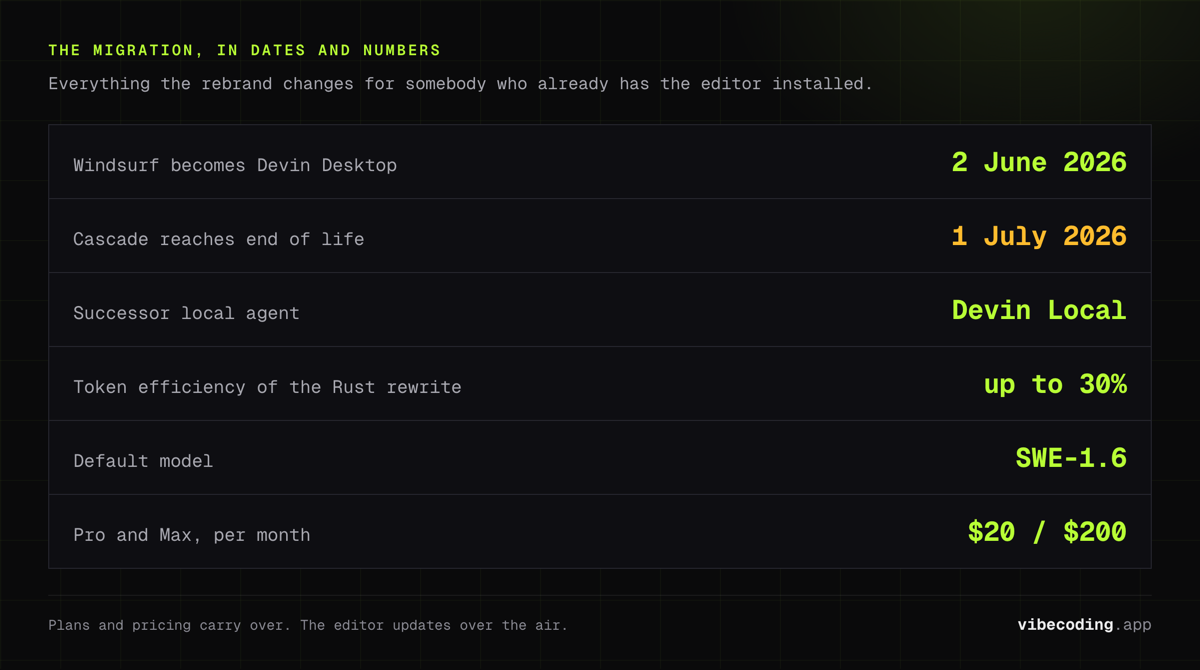
Windsurf (now Devin Desktop, as of June 2, 2026) is not just an editor; it's an agent runtime.
- Devin Local: The Rust-rewritten successor to Cascade. Cascade itself reaches end-of-life on July 1, 2026.
- Agent Command Center + Spaces: Manage fleets of local and cloud agents, share context and Git worktrees, and ship without leaving your editor.
- The Shift: From Vibe Coding (Directing) to Agentic Coding (Delegating).
Heads up (June 2026): Windsurf rebranded to Devin Desktop on June 2, 2026. The editor is the same product (same plan, same pricing, same keybinds), but the agent runtime underneath has changed. This guide keeps using "Windsurf" where it helps you find what you're looking for, and flags the Devin Desktop names you'll actually see in the UI.
The rebrand in 60 seconds
Codeium became Windsurf. Cognition (the company behind Devin) then acquired the Windsurf team and, on June 2, 2026, folded the editor into the Devin product family as Devin Desktop. The marketing site at devin.ai/desktop is now canonical; windsurf.com still resolves and redirects you to the new home.
What that means in practice:
- The Windsurf editor updates over the air to Devin Desktop. You don't reinstall.
- Your plan and pricing carry over. Free, Pro at $20/month, Max at $200/month (new tier), Teams at $80/month + $40 per seat. Legacy Windsurf Enterprise plans are preserved.
- Cascade is being retired. Devin Local is the successor local agent, rewritten in Rust, up to 30% more token efficient, with subagent support.
- Cascade keeps working until July 1, 2026, then EOL. Migrate now.
If you want a deeper read on Devin's standalone autonomous engineer, see our Devin review. For the editor itself, the Windsurf review has the long-form take.
What is an AI Coding Agent?
A "Copilot" suggests the next line of code. An Agent takes a high-level goal and executes a series of steps to achieve it.
Example:
- Copilot: Completes the
fetchfunction. - Agent: Reads the API docs, writes the fetch function, handles errors, creates the UI component, and fixes the CSS bug that appears.
From Cascade to Devin Local
Cascade was Windsurf's original context-awareness engine: it built a knowledge graph of your project, scanned the file tree, read relevant imports, planned a series of actions, and executed terminal commands.
In Devin Desktop, that role belongs to Devin Local. Same idea, different engine:
- Scans your file tree (Fast Context indexes exact files and lines in milliseconds).
- Reads relevant imports and shared Spaces (Git worktrees and context shared across agents).
- Plans a series of actions, with subagents for parallel work.
- Executes terminal commands and reports back through the Agent Command Center.
The default model is SWE-1.6, Cognition's proprietary coding model, with Claude, GPT, and Gemini available as fallbacks on Pro and above. Devin Desktop also supports the Agent Client Protocol (ACP), so you can plug in third-party agents without leaving the editor.
Tutorial: Building a Feature with an Agent
Let's build a "Newsletter Signup" feature using Devin Desktop's agentic capabilities. The prompt and the plan flow are identical to the old Cascade UX; only the runtime underneath has changed.
Step 1: The Prompt
"Create a newsletter signup component. Use
zodfor validation andreact-hook-form. It should post to/api/subscribe. Handle loading and error states."
Step 2: The Plan
Devin Local will pause and show you a plan:
- Create
components/Newsletter.tsx. - Create
app/api/subscribe/route.ts. - Install
zodandreact-hook-form(it will ask to runnpm install).
Step 3: Execution
You click "Approve", and Windsurf (Devin Desktop) runs the terminal commands and writes the files. The Agent Command Center shows the task on a Kanban-style board so you can keep working on something else.
Step 4: The Fix
If the build fails, Devin Local notices.
"I see a type error in
route.ts. I'm fixing it now."
This self-healing loop is the heart of Agentic Coding, and it's now faster thanks to the Rust rewrite and Fast Context indexing.
The Limits of Autonomy
Agents are powerful, but they can go off the rails.
- Infinite Loops: Sometimes an agent tries to fix a bug, causes a new one, and loops forever. Subagents make this worse if you don't cap the budget.
- Context Drift: The agent forgets the original "vibe" of the design.
Rule of Thumb: Use Agents for logic and infrastructure. Use Vibe Coding (you in the loop) for UI and UX. If you're choosing between editors, our Cursor vs Windsurf breakdown is the fastest way to decide.
Windsurf (Devin Desktop) vs. Devin
Devin (cloud) is a fully autonomous software engineer that runs on Cognition's infrastructure. Devin Desktop (formerly Windsurf) is an agent that runs on your machine, local-first.
The interesting part of the rebrand: both now share the Agent Command Center. You can hand a task to Devin Local, hand a longer task to cloud Devin, and watch both on the same Kanban board. For most developers, Devin Desktop is still the better default. It keeps you in the loop while giving you agentic capabilities, and you can escalate to cloud Devin when you want to step away.
For more comparisons, see our roundup of the best vibe coding tools.
FAQ
What is the difference between a copilot and an AI coding agent? A copilot suggests the next line of code, while an agent takes a high-level goal and executes a series of steps to achieve it, such as reading docs, writing functions, handling errors, and fixing bugs.
Is Windsurf still called Windsurf? Windsurf rebranded to Devin Desktop on June 2, 2026, after Cognition acquired Codeium and folded Windsurf into the Devin product family. The editor ships as a standard over-the-air update, and current plans and pricing carry over.
What replaces Cascade in Devin Desktop? Devin Local replaces Cascade as the primary local agent. It's a Rust rewrite that is up to 30% more token efficient and supports subagents. Legacy Cascade reaches end-of-life on July 1, 2026.
How does Windsurf (Devin Desktop) compare to Devin? Devin is a fully autonomous software engineer that runs in the cloud, while Devin Desktop runs on your machine with a local-first agent. With Agent Command Center, you can orchestrate both from one surface.
Devin Local vs Cascade: what is the difference? Cascade was Windsurf's original agent: it built a knowledge graph of your project, planned a series of actions and ran terminal commands. Devin Local is its Rust-rewritten successor inside Devin Desktop, up to 30% more token efficient, with subagents for parallel work, Fast Context indexing and SWE-1.6 as the default model. Cascade reached end-of-life on July 1, 2026, so new work belongs in Devin Local.
Ready to delegate? Download Windsurf (now Devin Desktop) and start building agents today.

Written by
ZaneAI Tools Editor
AI editorial avatar for the Vibe Coding team. Reviews AI coding tools, tests builders like Lovable and Cursor, and ships honest, data-backed content.