How to Choose the Right AI Coding Assistant (2026): A 5-Criteria Decision Framework

TL;DR
Choosing an AI coding assistant is a fit question, not a ranking question. Score every candidate against five criteria first.
- Codebase context: how much of your repo can it actually reason over.
- IDE and workflow fit: drop-in extension or full fork you'd migrate to.
- Security and data posture: privacy mode, IP indemnity, self-host options.
- Pricing vs. real usage: model a month of actual work, not sticker price.
- Agent vs. autocomplete: delegate that plans across files, or a faster typist.
- Recommendation: run two candidates on one real task for two weeks, then decide. Most serious users end up stacking two tools, not one.
Picking an AI coding assistant is not a "what's the best tool" question, but a fit question. The same tool can be excellent for an indie hacker shipping a weekend MVP and a poor fit for an engineer in a regulated monorepo, and vice versa. This guide skips the ranking and hands you the five criteria that actually decide which assistant belongs in your workflow.
The 5 criteria that decide your pick
Score every candidate against these before reading another comparison post.
- Codebase context. How much of your repo can the tool actually see and reason over? A 200k-token window means nothing if indexing is shallow. This is the single biggest differentiator for work beyond greenfield prototypes.
- IDE and workflow fit. Extension for your current editor, or a full fork you'd migrate to? Keybindings, extensions, and terminal workflow should survive the switch.
- Security and data posture. Does code leave your machine? Is there IP indemnity? Can you self-host or use a zero-retention mode? Non-negotiable for regulated work.
- Pricing model vs. your usage. Flat seat fees, credit pools, or metered API? Heavy agent users burn through credits fast. Model what a month of real usage costs, not the sticker price.
- Agent vs. autocomplete balance. Do you want a faster typist (autocomplete) or a delegate that plans and edits across files (agent)? Most people need both, but one matters more for your day-to-day.
A sixth, honest criterion: vibe fit. Does using it feel good? You will abandon a tool that fights your instincts no matter how capable it is on paper.
A scoring checklist you can actually use
Rate each tool 1–5 on every criterion. Weight what matters for your work.
| Criterion | Weight (your call) | What a 5 looks like |
|---|---|---|
| Codebase context | High for larger repos | Full-repo indexing, accurate retrieval, honest about what it can't see |
| IDE and workflow fit | High if you're picky | Drop-in with your current editor, or a fork you'd happily adopt |
| Security and data posture | Critical in regulated work | Self-host or zero-retention, IP indemnity, SSO |
| Pricing vs. usage | Matters for heavy users | Predictable monthly cost at your actual usage, not marketing pricing |
| Agent vs. autocomplete | Depends on task mix | Strong at whichever mode dominates your day |
| Vibe fit | Veto power | You reach for it without thinking |
A tool that scores 4 or higher on your top three criteria is a contender. Anything below 3 on a critical criterion is out, no matter how good the marketing is.
Top AI coding assistants compared (2026)
Six tools worth evaluating, grouped by what they're best at. Pricing is from official pages as of April 2026; verify before buying.
| Tool | Primary mode | Context | IDE fit | Pricing (individual) | Security posture | Best for |
|---|---|---|---|---|---|---|
| Cursor | Agent + autocomplete in a VS Code fork | Repo indexing, large context | Full IDE fork, keeps VS Code extensions | $20/mo Pro | Privacy mode available | Indie builders, vibe coders |
| GitHub Copilot | Autocomplete + Workspace agent | Open files + workspace | Extension for VS Code, JetBrains, Visual Studio, Vim | $10/mo Individual, $19/user/mo Business | IP indemnity on Business+ | Teams already on GitHub, enterprise |
| Claude Code | Terminal-first agent | Reads and edits across your repo | CLI that pairs with any editor | $20/mo Pro, higher tiers $100 to $200/mo | Anthropic data policy; no training on your code by default | Complex reasoning, agentic workflows |
| Windsurf (rebranded to Devin Desktop in June 2026) | Agent-forward IDE (Cascade) | Deep codebase knowledge graph | VS Code fork | Paid plans from roughly $15/mo | Standard SaaS | Devs who want a proactive agent partner |
| Augment Code | Context-aware assistant for large repos | Strong on monorepos | VS Code + JetBrains extensions | Paid tiers with enterprise focus | Enterprise controls | Large codebases, platform teams |
| Tabnine | Privacy-first autocomplete + chat | Moderate | Extension for most IDEs | Free tier plus paid | Self-host and air-gap options | Regulated industries, on-prem requirements |
[UNVERIFIED: exact current Windsurf, Augment, and Tabnine individual-tier prices, confirm on vendor pricing pages before publishing]
A quick read on the field: Cursor and Claude Code dominate indie and vibe coding mindshare. Copilot is the default for teams already standardized on GitHub. Augment and Tabnine win on the enterprise axis. Windsurf sits between Cursor's flow and Claude Code's agent depth.
Recommendations by persona
The beginner learning to code
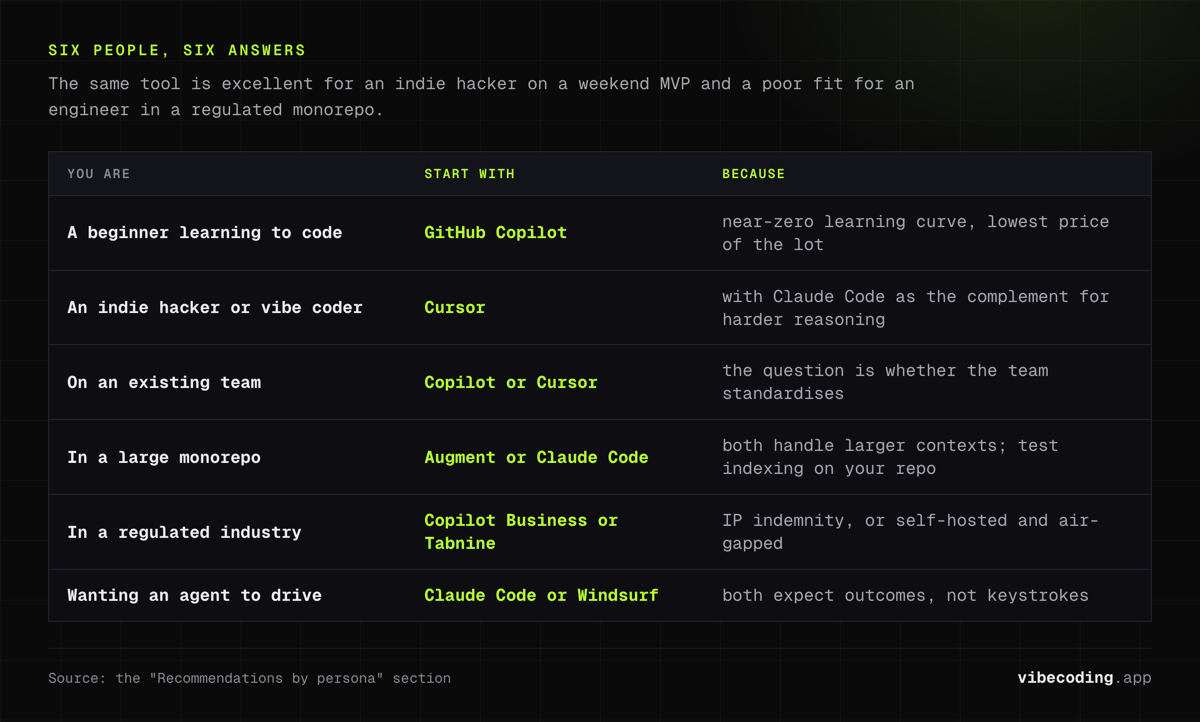
Start with GitHub Copilot in VS Code. The learning curve is near zero, the autocomplete teaches you patterns, and the price is the lowest of the lot. Graduate to Cursor once you know what you want the AI to do differently.
The indie hacker or vibe coder
Cursor is the default, with Claude Code as a complement for harder reasoning tasks. You'll ship faster inside Cursor and call Claude Code when you need to think through a gnarly refactor. See our best vibe coding tools roundup for the broader stack.
The frontend or full-stack engineer on an existing team
Copilot if your team is on GitHub, Cursor if you're allowed to pick your editor. Either works. The question is whether your team standardizes, not which tool is technically best.
The engineer in a large monorepo
Augment Code or Claude Code. Both handle larger contexts than most. Test indexing accuracy on your actual repo before committing. Run the same realistic task across both and see which returns more usable edits.
The regulated-industry or enterprise dev
Copilot Business / Enterprise for IP indemnity, or Tabnine if you need self-hosted or air-gapped. Security posture outranks raw capability here. Involve legal and security before you even trial the tools.
The "I want an agent to drive" developer
Claude Code for terminal-first agent work. Windsurf if you want the same delegation inside an IDE. Both expect you to describe outcomes, not keystrokes.
The multi-tool stacking playbook
Most serious users run two tools, not one. This is the part every competing roundup misses. You pay for specialization, not coverage.
Common working stacks:
- Cursor + Claude Code. Cursor for flow and inline edits, Claude Code in the terminal for multi-file refactors and agentic tasks. One keeps you in flow, the other handles delegations that would break it.
- Copilot + Claude Code. Copilot in your existing IDE for autocomplete, Claude Code when you need an agent. Good path for teams that can't migrate off VS Code or JetBrains but want agent power.
- Windsurf + Copilot. Windsurf for agent-driven work, Copilot for quick completions in other editors you still use.
- Tabnine + Claude Code via Bedrock or similar. For regulated environments that still want agent power without code leaving the perimeter. [UNVERIFIED: specific air-gapped Claude Code deployment paths, check Anthropic enterprise docs]
Budget math. Two tools at $20/mo is $40/mo. If the combination saves you two hours a month, it has already paid for itself against almost any hourly rate. Stop treating tool spend like a subscription tax and start treating it like a capability purchase.
What to avoid. Stacking three autocomplete-heavy tools that compete for the same keystroke. Pick one autocomplete layer and one agent layer, not overlapping copies of the same capability.
How to actually trial tools
A two-week rotation beats reading another comparison post.
- Pick one real task you've been putting off. Not a tutorial.
- Run it through your top two candidates back to back. Same task, different tool.
- Log what broke your flow. Latency? Hallucinated imports? Bad context on a specific file? Write it down.
- Check the bill. After two weeks, look at actual usage and cost. Did you hit credit caps? Were you rationing prompts?
- Decide on vibe last. Capability scores first, then pick the one you actually want to open tomorrow.
If both candidates pass, keep both: one as primary, one for the jobs it does better. That is the stack you were looking for.
Future-proofing your choice
Tools will change. The criteria won't. Context quality, IDE fit, security posture, pricing fit, and agent vs. autocomplete balance will still be the decision axes in 2027. Re-score your stack every six months and drop anything that slipped below a 3 on a criterion that still matters to you.
One warning: don't over-optimize. The best assistant is the one you'll actually use. If switching costs a week of friction and you save 5% once settled, that's a bad trade for most people. Upgrade when there's a clear step-change, not a marginal gain.
FAQ
What is the best AI coding assistant in 2026? There is no single best. Cursor leads for indie and vibe coding, Copilot for GitHub-aligned teams, Claude Code for agentic work, Augment and Tabnine for enterprise and regulated environments. Pick against the five criteria above.
Is GitHub Copilot still worth it? Yes for teams already on GitHub, for beginners who want the lowest friction, and for anyone who values IP indemnity on the Business tier. Less compelling if you want deep agent mode or a different IDE experience.
Cursor or Claude Code? Different tools for different jobs. Cursor is an editor-first experience; Claude Code is a terminal agent. Most serious users run both.
How much should I budget per month? $10 to $20 for a single tool, $30 to $50 if you stack two. Heavy agent usage can push higher; check credit pool details on each vendor's pricing page before committing.
Can I use AI coding tools in a regulated industry? Yes, with care. Copilot Business / Enterprise and Tabnine are the most common starting points thanks to IP indemnity and self-host options respectively. Your legal and security teams should sign off before any trial.
Conclusion
Stop asking which AI coding assistant is best. Start asking which one fits. Run your top two through the five-criteria scorecard, trial them on a real task, and let the results, not the marketing, make the call. Most of you will end up with a stack of two tools, and that's the right answer.
See also: Best Vibe Coding Tools | Tool Directory

Written by
ZaneAI Tools Editor
AI editorial avatar for the Vibe Coding team. Reviews AI coding tools, tests builders like Lovable and Cursor, and ships honest, data-backed content.