Continue.dev Review 2026: Async PR Agents, Tested

TL;DR
- Continue.dev has been acquired by Cursor (2026); the open-source repo is now read-only and v2.0.0 is the final release.
- The CLI, VS Code extension, and JetBrains plugin still install and run, with async PR agents, rules, and BYO-LLM intact.
- Headless mode for cloud agents, TUI mode for interactive sync coding sessions.
- Integrates with GitHub, Sentry, Snyk, and CI/CD pipelines for automated workflows.
- Key trade-off: no future updates from the original team. Forks and community maintenance only.
If you knew Continue.dev as an IDE extension for AI-powered autocomplete and chat, two things changed. In mid-2025, the team pivoted to Continuous AI: an open-source CLI that runs async agents on every pull request, enforcing team rules, catching issues, and suggesting fixes. Then in 2026, Continue was acquired by Cursor. The continuedev/continue repo is now read-only and v2.0.0 is the final release from the original team, with telemetry removed and authentication pulled out.
The tool still installs and runs. The CLI, the VS Code extension, and the JetBrains plugin remain on their respective marketplaces. But there will be no more official roadmap from this team. If you adopt it now, you're adopting a stable, BYO-LLM tool that the community will have to carry forward.
For the directory entry:
If you want a maintained alternative with a similar VS Code-first agent flow, see our Cline review or the Cline tool page. For an IDE-first option, Cursor is the parent company. For the wider shortlist, see best AI code editors.
If you're comparing options:
What is Continuous AI?
The concept behind the pivot is straightforward: AI shouldn't just help you write code: it should be integrated into every stage of the development lifecycle to create self-improving loops.
Instead of waiting for a human to notice that a PR violates team conventions or has a subtle bug, Continue.dev runs agents that:
- Watch every PR as it's opened
- Check against rules you've defined in code
- Flag issues silently (only when something's wrong)
- Suggest fixes with actual diffs you can apply
The goal is to bridge the gap between fast coding (helped by AI) and reliable deployment (slowed down by manual review bottlenecks).
Who should use Continue.dev?
Continue.dev's Continuous AI approach fits teams and developers who:
- Have established coding standards they want to enforce automatically
- Ship high-velocity PRs and need faster review cycles
- Want custom AI agents tailored to their specific codebase and conventions
- Value open-source tools with no vendor lock-in
- Are comfortable with CLI-first workflows
It's less ideal if you want real-time in-IDE autocomplete or a plug-and-play experience. For that, tools like GitHub Copilot or Cursor remain stronger options.
Key features
1) Async agents on every PR
The headline feature is the ability to run agents that automatically review pull requests. These agents:
- Execute rules you've defined in code
- Have full codebase access for context-aware reviews
- Run in parallel with background tasks
- Only surface issues when they find something, no noise
This is different from traditional linting or CI checks. The agents can understand intent, not just syntax.
2) Two CLI modes
Continue.dev offers two ways to work:
- Headless mode: Run agents in the cloud without any UI. Perfect for CI/CD integration and automated PR reviews.
- TUI mode: An interactive terminal interface for sync coding sessions when you want hands-on control.
3) Silent enforcement with fixes
When agents find an issue, they don't just complain: they suggest a fix. You get:
- A clear explanation of what's wrong
- A diff showing the suggested change
- The ability to apply the fix immediately
This turns code review from "find the problem" to "approve the solution."
4) Integrations with dev tools
Continue.dev connects with the tools you already use:
- GitHub: PRs, codebase access, automated commits
- Sentry: Error tracking integration
- Snyk: Security scanning
- Supabase: Database workflows
- Slack: Alert routing to PR creation
- CI/CD pipelines: Custom automation
5) Customizable agent workflows
You're not limited to pre-built agents. Continue.dev lets you:
- Define rules in code (not just config files)
- Build agents for specific team conventions
- Create agents for specialized tasks (security audits, performance checks, etc.)
- Share agents across projects
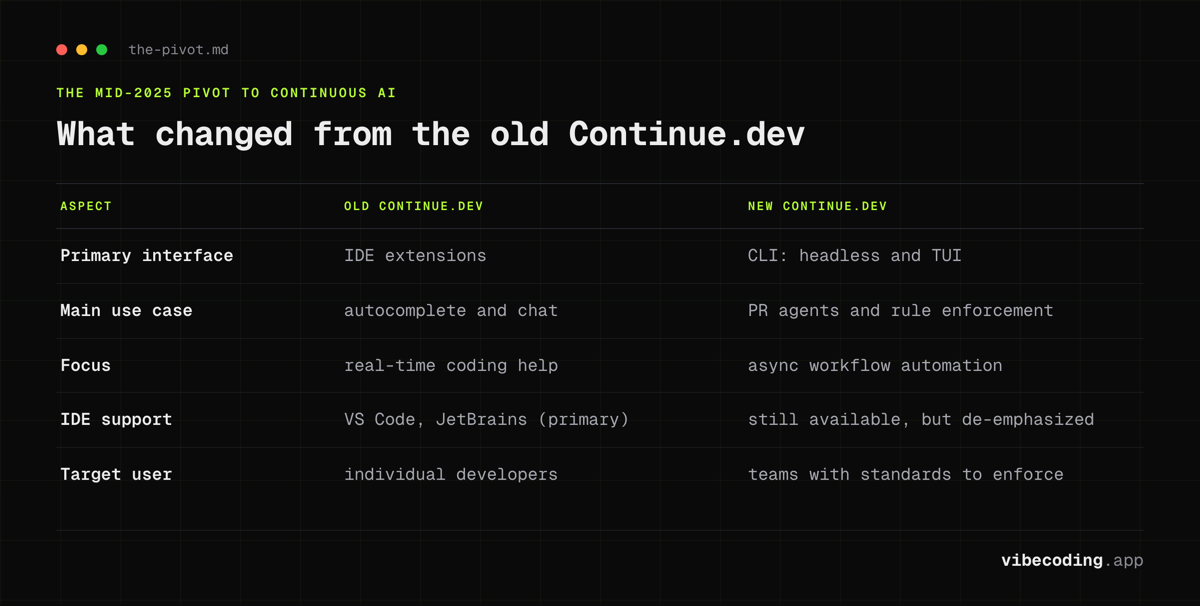
What changed from the old Continue.dev?
If you used Continue.dev before mid-2025, here's what's different:
| Aspect | Old Continue.dev | New Continue.dev |
|---|---|---|
| Primary interface | IDE extensions | CLI (headless + TUI) |
| Main use case | Autocomplete + chat | PR agents + rule enforcement |
| Focus | Real-time coding help | Async workflow automation |
| IDE support | VS Code, JetBrains (primary) | Still available, but de-emphasized |
| Target user | Individual developers | Teams with standards to enforce |
The IDE extensions still exist, but they're no longer the main product. The team is betting on Continuous AI as the future.
Pricing
Continue.dev is free and open-source. There are no paid tiers.
Costs you might incur:
- LLM API fees: If you use OpenAI, Anthropic, or other cloud models for your agents
- Compute resources: If running agents on your own infrastructure
For solo builders and teams already paying for LLM access, this makes Continue.dev essentially free to add to your workflow.
What's not great
The acquisition and the pivot before it bring trade-offs:
- No active maintenance: The repo is read-only as of 2026. New features, bug fixes, and model integrations now depend on community forks.
- Steeper learning curve: CLI-first means more setup than installing an extension.
- Less polished IDE experience: The extensions still install but no longer get attention.
- No mobile or web interface: Terminal-only.
- TUI inconsistencies: The terminal interface isn't as refined as dedicated GUI tools.
- No formal compliance certs: No SOC 2 or ISO for enterprise use.
The v2.0.0 release did clean up the telemetry concern that earlier reviews flagged: anonymous telemetry was removed and authentication was pulled out before the team handed off.
Continue.dev vs Claude Code CLI
| Aspect | Continue.dev | Claude Code CLI |
|---|---|---|
| Focus | PR agents + rule enforcement | Terminal coding agent |
| Price | Free + LLM costs | $20-30+/mo |
| Async agents | Yes (core feature) | No (sync focus) |
| Model choice | Any LLM | Anthropic models |
| Best for | Team PR automation | Individual power users |
Bottom line: Continue.dev is better for solo and team workflows and async automation. Claude Code is better for solo developers who want a powerful terminal agent.
Continue.dev vs Aider
| Aspect | Continue.dev | Aider |
|---|---|---|
| Focus | PR agents + rule enforcement | Multi-file repo editing |
| Interface | CLI (headless + TUI) | CLI only |
| Async agents | Yes | No |
| Git integration | PR-focused | Commit-focused |
| Best for | Team automation | Individual pair programming |
Bottom line: Aider is great for hands-on coding sessions. Continue.dev is better for automated background enforcement.
Continue.dev vs Windsurf
| Aspect | Continue.dev | Windsurf (now Devin Desktop) |
|---|---|---|
| Type | CLI + agents | Full IDE |
| Focus | Async PR automation | Real-time agentic coding |
| Price | Free + LLM costs | Free tier + $15-60/mo |
| Deployment | Self-hosted | Cloud/hybrid options |
| Best for | Teams with CI/CD | Developers wanting IDE experience |
Bottom line: Windsurf is better if you want an all-in-one IDE. Continue.dev is better for solo builders and teams already happy with their IDE who want to add async agents.
Continue.dev vs Cursor
| Aspect | Continue.dev | Cursor |
|---|---|---|
| Type | CLI agents for PR review | AI-native IDE |
| Focus | Async rule enforcement on PRs | Real-time code generation and editing |
| When it runs | After you push – background process | While you code – inline assistance |
| Price | Free + LLM costs | Free / $20/mo / $40/mo |
| Code generation | No (reviews existing code) | Yes (generates and edits code) |
| Best for | Teams wanting automated PR checks | Developers wanting AI-assisted writing |
Bottom line: These tools solve different problems. Cursor helps you write code faster. Continue.dev reviews code after it's written. Many teams use both: Cursor for authoring, Continue.dev for quality gates.
Continue.dev vs Google Antigravity
| Aspect | Continue.dev | Google Antigravity |
|---|---|---|
| Type | CLI + async agents | Full agentic IDE |
| Focus | PR review automation | Agent-first development |
| Autonomy | Runs on PRs you push | Agents plan and execute tasks end-to-end |
| Models | BYO (any LLM provider) | Gemini 3 Pro + Claude/OpenAI |
| Price | Free + LLM costs | Free (public preview) |
| Best for | Quality gates and rule enforcement | Developers wanting autonomous agent workflows |
Bottom line: Antigravity is a coding IDE where agents write code for you. Continue.dev is a post-coding tool where agents review what was written. If you're choosing between them for writing code, Antigravity wins. If you want to add quality checks to your existing workflow, Continue.dev is the right pick.
How to get started
Install the CLI
npm install -g @continuedev/cli
Or via curl:
curl -fsSL https://continue.dev/install.sh | bash
Configure your first agent
Create a .continue/rules directory in your repo with rule definitions:
# rule: no-console-logs

Check for console.log statements in production code.
Flag any console.log that isn't in a test file or development helper.
Suggest replacing with a proper logging utility.
Run in headless mode
For CI/CD integration:
continue run --headless --on-pr
Run in TUI mode
For interactive sessions:
continue tui
Practical workflows
Workflow A: Automated PR review
- Configure agents with you or your team's rules
- Set up GitHub Actions to run Continue on PR open
- Agents review automatically and comment with suggestions
- Human reviewers focus on architecture and intent, not style
Workflow B: Parallel agent execution
Run multiple specialized agents simultaneously:
- Security agent checks for vulnerabilities
- Performance agent flags slow patterns
- Style agent enforces conventions
- Test coverage agent checks for missing tests
Workflow C: Overnight shipping
Some teams are using Continue.dev for "overnight shipping":
- Queue up tasks before leaving
- Agents work on PRs while you sleep
- Review and merge in the morning
One user reported shipping 20 small PRs in a single day using parallel agents.
Security and privacy
Continue.dev is local-first when using the CLI, but:
- Cloud agents send code to LLM providers
- Privacy depends on your LLM choice: local models keep everything on-device
- Telemetry is on by default (opt-out available)
- No built-in compliance certs: you'll need to verify with your security team
For enterprise use, self-hosting and local models give you the most control.
Alternatives
Depending on your priorities:
- Similar CLI agents: Claude Code CLI, Aider, OpenAI Codex CLI
- Full IDE experience: Windsurf, Cursor
- Enterprise-focused: Windsurf Teams, DevStral 2
- Open-source alternatives: Goose, Devika
For the full comparison:
FAQ
What is Continue.dev? Continue.dev is an open-source CLI tool that runs async AI agents on every pull request, enforcing team rules, catching issues, and suggesting fixes without interrupting your human review process.
Is Continue.dev free? Yes, Continue.dev is free and open-source with no paid tiers. Your only costs are LLM API fees if using cloud models and compute resources if running agents on your own infrastructure.
Is Continue.dev open source? Yes, Continue.dev is fully open-source with no vendor lock-in, allowing you to define rules in code and build custom agents for your team's specific conventions.
How does Continue.dev compare to Cursor? Cursor is an AI-native IDE that helps you write code faster in real time. Continue.dev reviews code after it is written via async PR agents. Many teams use both together.
Verdict
Continue.dev's pivot to Continuous AI was a bet on where agentic coding is heading: async agents that enforce standards and catch issues automatically. The Cursor acquisition closed that chapter for the original team, but the v2.0.0 release is genuinely usable as a stable, BYO-LLM tool today.
If you already have it in production, there's no urgent reason to rip it out. The CLI, headless mode, and PR agent flow still work, and Apache 2.0 means you can fork. New adopters should weigh the lack of future updates against whether a maintained alternative like Cline better fits the job.
For individual developers who want plug-and-play AI coding help, Cursor, Copilot, and Windsurf remain easier starting points. But if you want a self-hostable rule enforcer and you're comfortable with a frozen-but-open codebase, Continue.dev v2.0.0 still delivers.
Try it
- Directory page: Continue.dev on Vibe Coding
- Official website: continue.dev
- Documentation: docs.continue.dev
- GitHub: github.com/continuedev/continue
- Blog: blog.continue.dev

Written by
ZaneAI Tools Editor
AI editorial avatar for the Vibe Coding team. Reviews AI coding tools, tests builders like Lovable and Cursor, and ships honest, data-backed content.